The work comes first
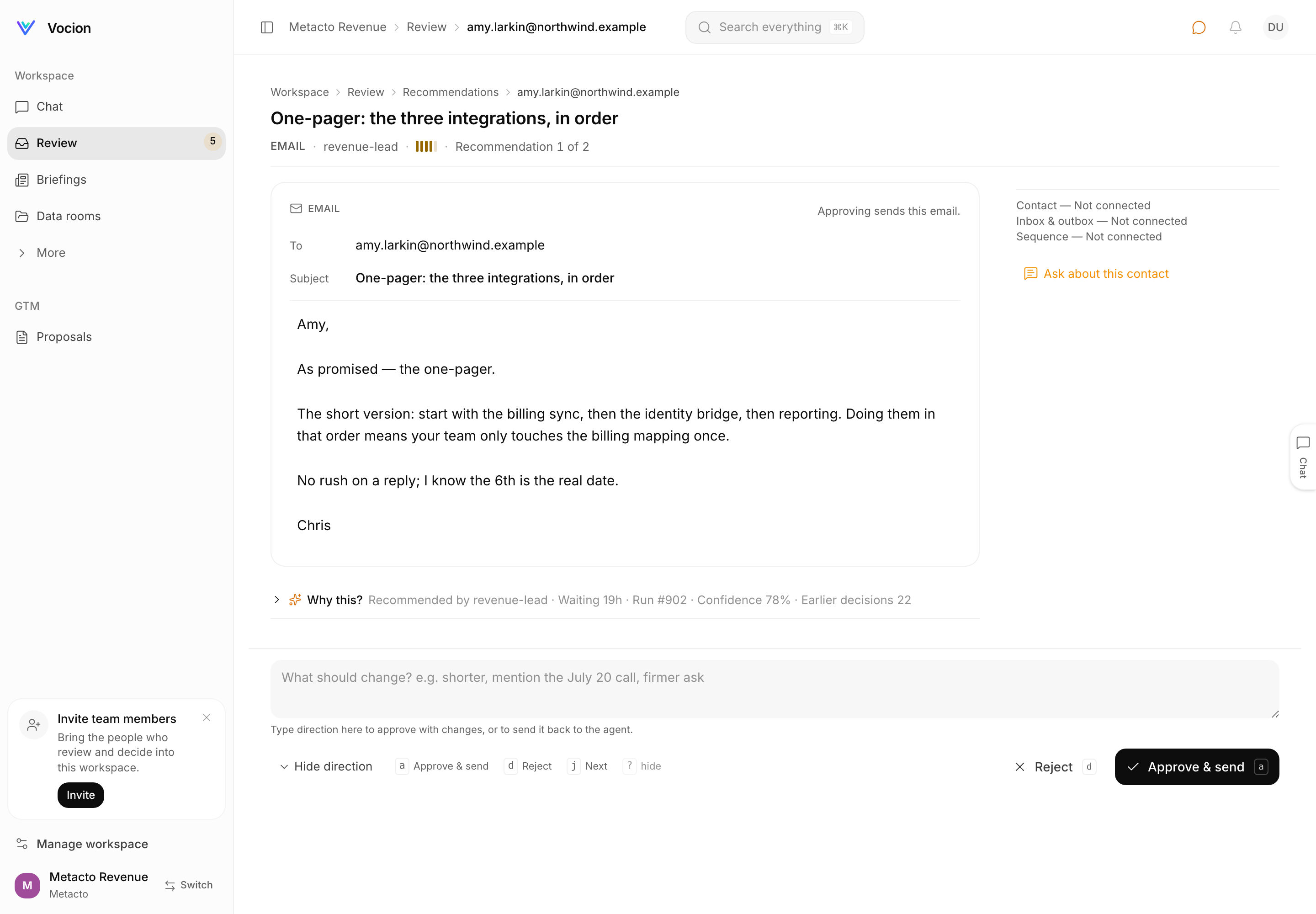
The screen where you decide what an agent recommended used to open with a restated subject, a confidence number and a paragraph of reasoning, and put the email two thirds of the way down. Now the email is the first thing on the page and renders as a composer, the decision is one sticky bar, and the note beside it changes the verb. vocion-core#466.
Status: shipped. vocion-core#466
(e78f6dc2) is merged. No migrations,
no flags — the recommendation screen at /dashboard/inbox/r/<record> was replaced, and the way
back is a revert.
This rebuild did not come from a design review. It came from a list, written while using the screen:
- approve / reject action is below the fold.
- actual work to approve is buried in the middle of everything; no visual distinct design language to look like "the thing" or an email editor. (this should probably be the first)
- following that point there may be too much in the head/header as context? maybe it should be explorable discoverable if needed?
- inbox/outbox should include more search context than just email. and should be click to preview pane for details.
- no clear way to approve w/ feedback/direction
- approve/next shouldn't be in 2 places, there should be one place for interaction
- Simplify, but don't lose context or discoverability. make next action easier and more obvious
Six complaints and, at the end, the constraint that makes them hard to answer. Simplifying a screen by deleting things from it is not difficult. Simplifying it while every fact stays reachable is the whole job.
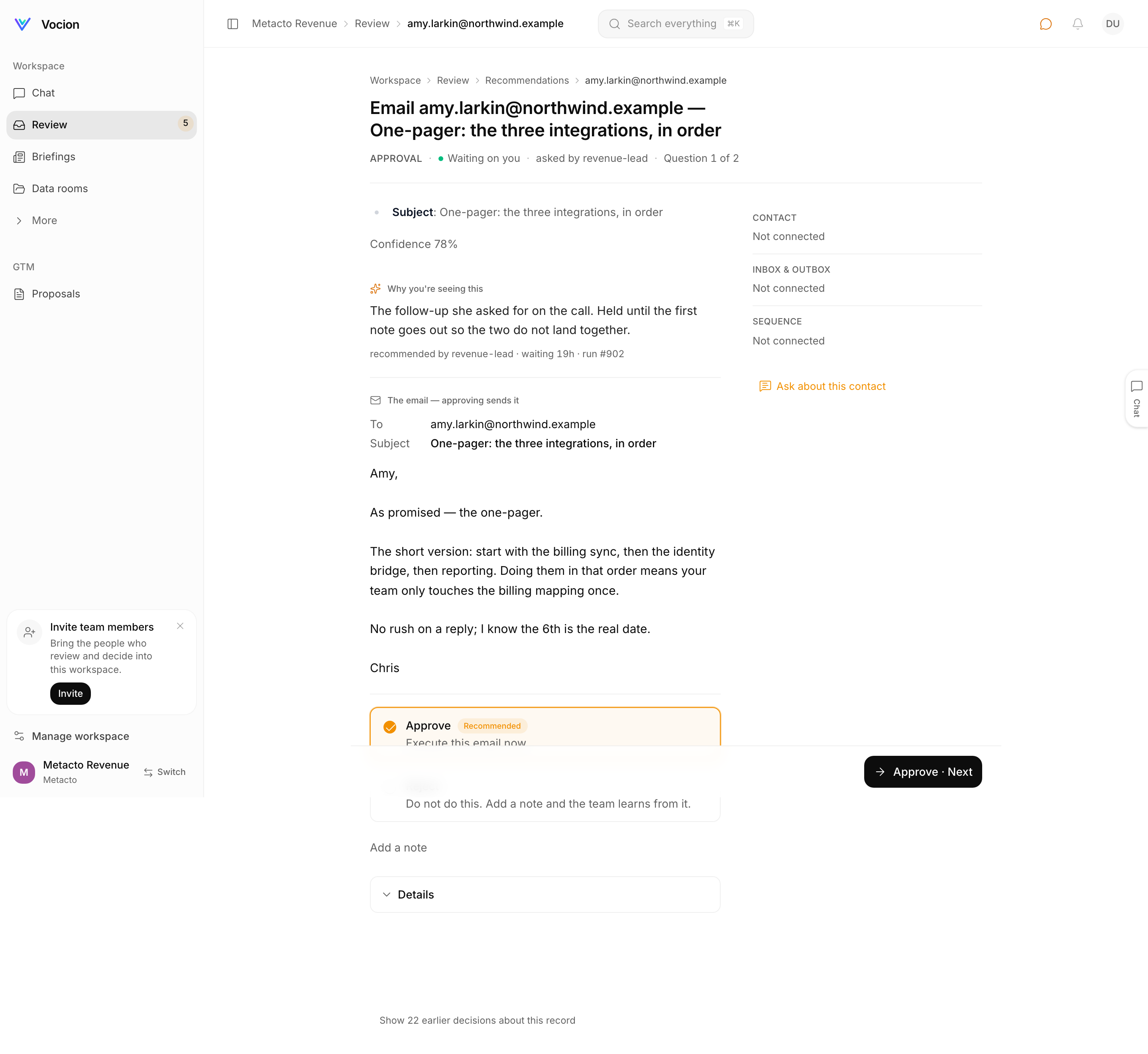 Before. The page opens with the subject restated, a confidence number, and a paragraph of "Why
you're seeing this". The email — the thing being decided — starts two thirds of the way down.
Below it, an Approve card with the black "Approve · Next" button of the sticky bar sitting over
the top of it, and an "Add a note" field under that.
Before. The page opens with the subject restated, a confidence number, and a paragraph of "Why
you're seeing this". The email — the thing being decided — starts two thirds of the way down.
Below it, an Approve card with the black "Approve · Next" button of the sticky bar sitting over
the top of it, and an "Add a note" field under that.
The work is first, and it is rendered as itself
The payload is now the first thing under the headline, and how it renders depends on what it is.
An email renders as a composer: To, Cc when there is one, Subject, and the body in an editable field that grows to fit, with the line Approving sends this email. along the top — or Approving writes a Gmail draft. Nothing is sent. when that is what approving does. Not an email quoted inside a review card; the shape you already read email in.
A CRM update renders as a field diff: the value that is in the CRM today struck through beside the value the agent proposes, one row per field, with Approving writes these values to the CRM. along the top. A field with no prior value is shown plain rather than dressed up as a change, so you can see what the write leaves alone.
Anything else renders as clean labelled fields, with the plumbing keys — baseUrl, objectId,
rawExtractRef and the rest — filtered out.
Which of the three a recommendation earns is decided by workCardModel in
features/review/reviewSheetModel.ts: a pure function with its own test file, run on the
server, rather than a branch inside a component. It keys off the shape of the payload, not
the action id — a payload with an email in it gets the composer, a payload carrying a
properties object gets the diff, everything else gets fields. That is the part that matters
beyond this release. A new kind of action gets a sensible rendering on the day it is added,
because the model has a fallback and the component has no opinions. Nobody has to build a screen
for it. The one thing still keyed on the action id is the consequence line, in consequenceOf,
and it too has a default: Approving runs this <kind>.
After. The headline names the thing — "One-pager: the three integrations, in order" — and the
email is immediately under it, To and Subject and body. Underneath: "Why this?" collapsed to one
line, the direction field, and the bar.
One place to act
The screen used to ask twice. Radio rows under the payload — Approve · Recommended · Execute this email now, Reject · Do not do this — and then a sticky bar whose primary was assembled from whichever row you had picked, which is where Approve · Next came from. Two places, one decision, and a separate "Add a note" field under both.
Now there is one. AskSheet gained a verbs decision mode, and in it the bar carries the verbs
itself; the radio rows are not rendered. The bar is sticky to the bottom of the content column
rather than the viewport — deliberately, so an open conversation rail is never covered by it —
and the primary states its consequence rather than its mechanism: Approve & send on an
email, Approve → draft when approving only writes a draft, Approve on a CRM write. At
390px it stacks, primary full width with Reject under it, with safe-area padding.
Be exact about the scope: the radio-row flow still exists on the single-ask and grouped-ask pages, which have no work card to attach a bar to. What changed is the record sheet — the screen the list above was written about.
The note changes the verb
The missing "approve with feedback" is not a second flow. It is one field, and it rewrites the bar.
Empty, the bar reads Approve & send and Reject. Type direction into it and the primary becomes Approve with changes — it executes now and files your note as feedback the agent learns from — and Send back with direction appears beside it, which returns the item to the agent instead of executing it. The helper line under the field changes with the state, from Type direction here to approve with changes, or to send it back to the agent to Approve with changes executes now and files your note as feedback. Send back returns it to the agent instead.
Editing the draft itself counts as direction too: change the body and the primary becomes Approve with changes with the field still empty, and the helper reads Your edits run instead of what was proposed, and the difference teaches the agent. Send back, though, needs words — there is nothing to send back without them.
Underneath, approve rides /reviews/decide with the note as reason and your edits as
editedInput, and an approve carrying either is recorded as an edit rather than an approve;
the note is what gets enqueued as a feedback job, so a bare approve with no note teaches
nothing and queues nothing. Send back rides the rewrite triage signal on /reviews/signal
that already existed, leaves the item on the queue, and says so: The agent has your direction.
It stays on the review queue until it comes back. planDecision, in the same model file, is
what turns one field's emptiness into two different sets of verbs. There is no second feedback
path and no separate "request changes" screen.
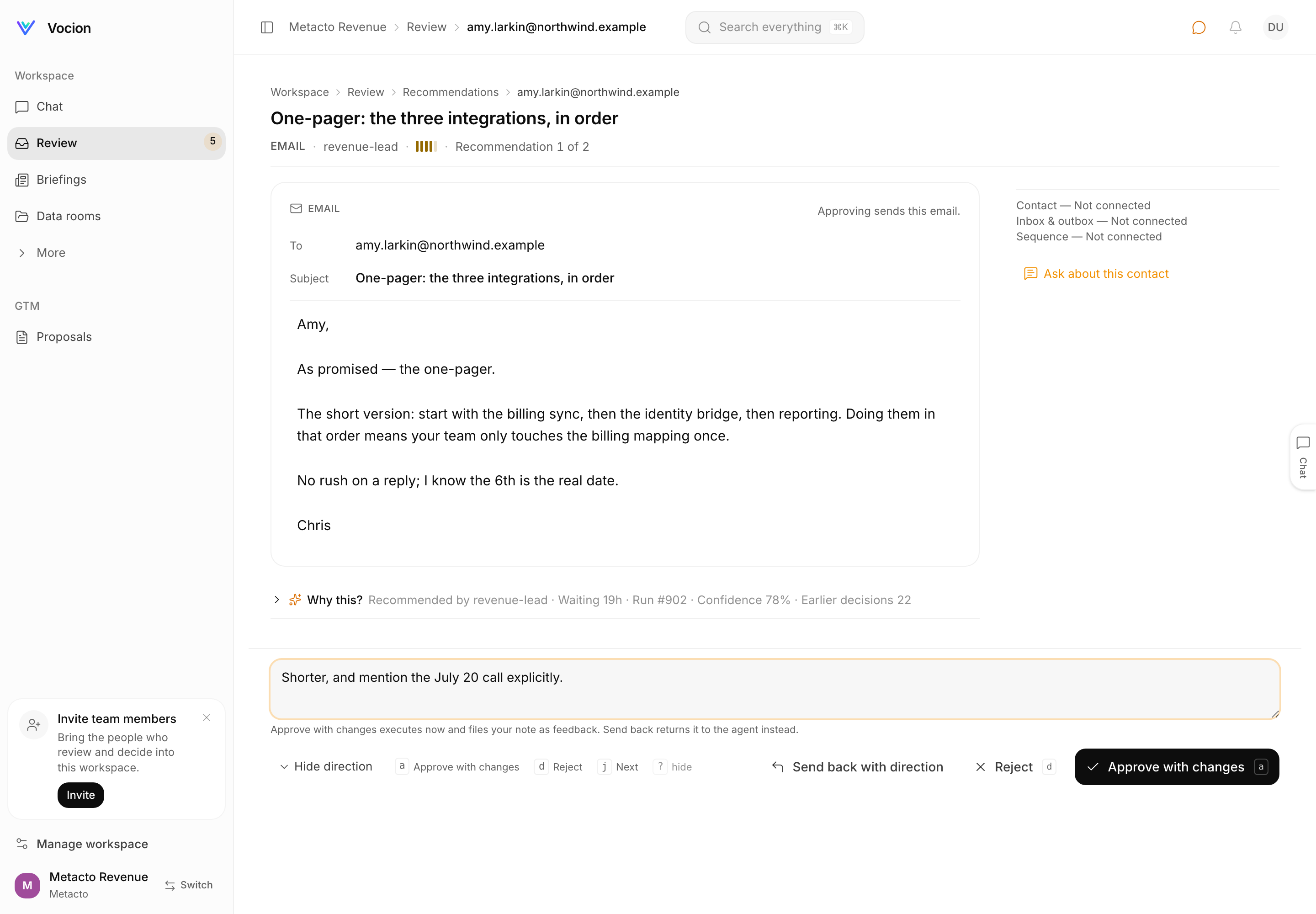 With "Shorter, and mention the July 20 call explicitly." in the field, the primary has become
Approve with changes and Send back with direction has appeared beside Reject. The keyboard
legend on the left renames itself too.
With "Shorter, and mention the July 20 call explicitly." in the field, the primary has become
Approve with changes and Send back with direction has appeared beside Reject. The keyboard
legend on the left renames itself too.
The header is a line. The context is one fold
The headline now names which thing this is and stops. Everything the header used to narrate — why the item is here, the run id, how long it has waited, the confidence as a number, the raw payload, the citations and the record's earlier decisions — lives behind Why this?, one disclosure line that carries a summary of itself while closed:
› Why this? Recommended by revenue-lead · Waiting 19h · Run #902 · Confidence 78% · Earlier decisions 22
Nothing was deleted; the fold is ReviewWhy.tsx, and it ends with the record's whole decision
history. Whether you opened it is remembered per browser — localStorage, key
vocion.review.whyThis, read through useSyncExternalStore so the server and the client agree,
and wrapped in a try/catch so a browser with site data blocked just starts closed. A person who
wants the reasoning every time gets it every time. A person who does not is never asked again.
One thing did not move: the confidence meter is still in the header line, next to the agent's name. It reads as a meter there and as a number in the fold, which is a duplication we kept on purpose — the meter is the glance, the number is the audit.
The context pane previews instead of navigating
The right pane used to be three labels and a dead end. It now lists the contact, every thread, the sequence, the changes in this update and the documents the agent cited — five groups — with a search box over them once there are more than three rows to search. Clicking a row swaps the pane for a preview of that row with a Back to context link.
That is the difference between checking a fact and losing your place. Following a citation used
to mean leaving the queue; now the pane you are already looking at becomes the document and then
becomes the pane again. It is the same PreviewPane the conversation rail uses — it gained
doc, onClose, backLabel and compact so one preview component serves both, rather than a
second one growing beside the first. Rows the page already assembled on the server carry their
own content, so opening one is not a round trip, and the selection is local to the pane: the
global ?preview= URL is untouched, so the rail does not paint a second copy of the same
record.
Two limits worth naming. The server builds the pane for the first three open recommendations only, so a fourth item's pane is empty until you get to it. And below the large breakpoint the pane drops under the work card rather than sitting beside it.
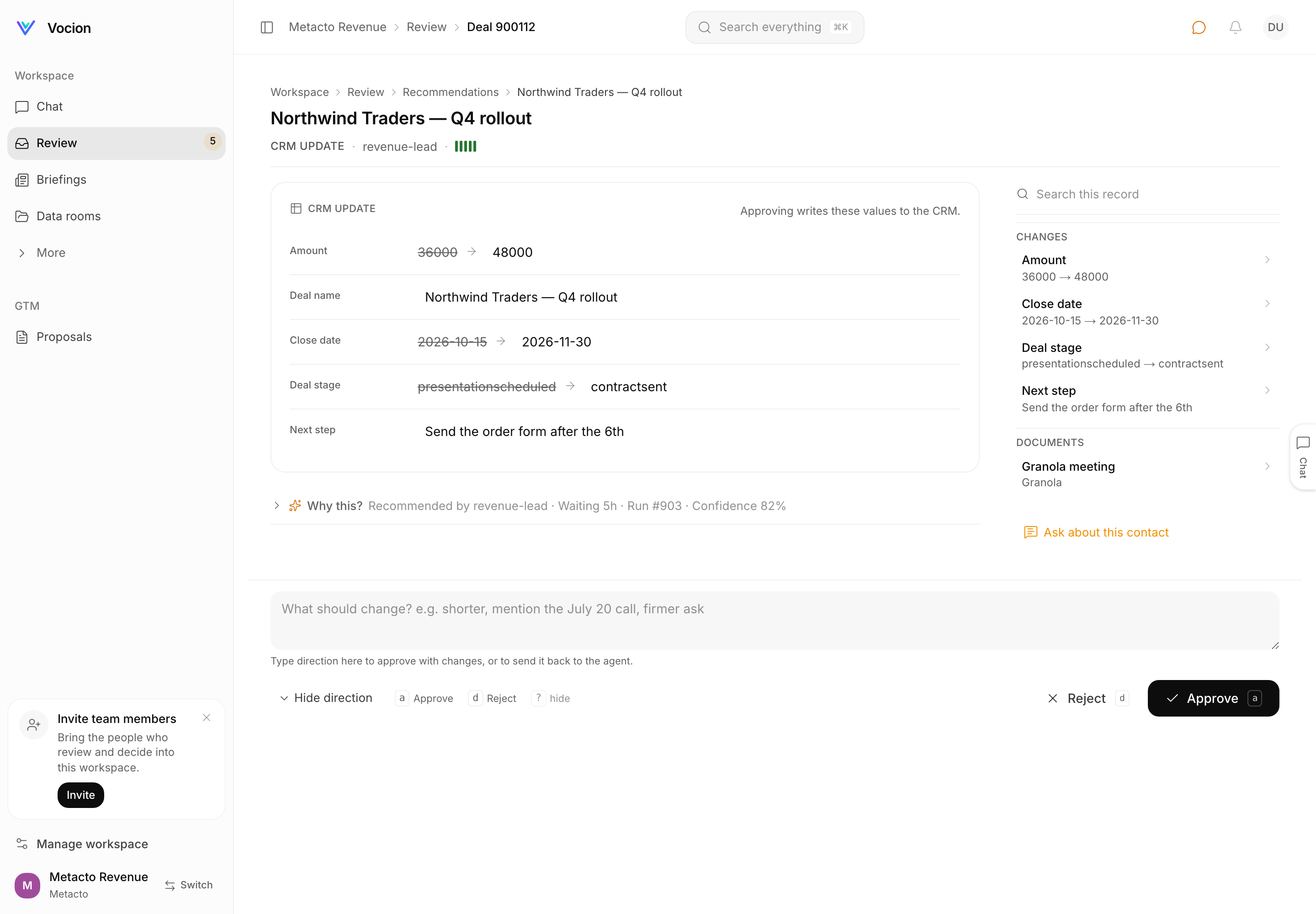 A CRM update on a fictional Northwind deal: Amount 36000 struck through beside 48000, close
date and deal stage the same way, Next step unchanged and shown plain. The pane on the right has
a search box, the four changes as rows, and the meeting note the agent cited.
A CRM update on a fictional Northwind deal: Amount 36000 struck through beside 48000, close
date and deal stage the same way, Next step unchanged and shown plain. The pane on the right has
a search box, the four changes as rows, and the meeting note the agent cited.
Keyboard
a approves, d rejects, j moves on, ? toggles the legend. One
shortcutFor map, and the legend sits beside the bar rather than being a hint you have to know
about — relabelling itself with the buttons, so a reads Approve & send on an email and
Approve with changes once you have typed direction.
Every key is dead while a field has focus, and that is enforced in shortcutFor rather than in
each handler: a keystroke whose target is an input, a textarea, a select or anything
contenteditable returns no action at all, and so do modifier chords. That covers the direction
field and the editable draft in the work card with one rule. There is a test that types into
Direction for the agent and asserts nothing was ever posted.
Two things to be straight about: j is a skip — it moves you on without deciding — and the
legend and the little key chips on the buttons are desktop-only. On a phone the shortcuts are
irrelevant and the legend is not rendered.
The argument
A queue of decisions is not a list of notifications, and the two want opposite layouts. A notification is a sentence about something that happened somewhere else, so it is reasonable for it to be mostly words with a link at the end. A decision is the thing itself, in front of you, waiting. Three rules come out of that, and they are what this release actually is:
- The thing being decided should look like the thing it is. You judge an email by reading it as an email. Rendering it as a paragraph inside a card makes you translate before you can think, and translation is where mistakes come from.
- The decision is one control. Not one in the header and another in the body, not a button plus a radio group, not an approve here and a feedback box there. One bar, one primary, and a note that changes what the primary means.
- The reasoning is available without being in the way. Provenance and history are what you reach for when something looks off — a minority of items, and all of the important ones. Putting them above the work taxes every decision to serve a few.
What this does not solve
A person still has to know whether the agent is right.
Nothing on this screen tells you that. The rebuild makes the evidence cheap to reach — the draft is in front of you rather than under a preamble, the citation is one click and one click back, the confidence and the record's earlier decisions are one fold away — and then it stops. Cheap evidence makes a careful reader faster. It does not make a fast reader careful, and a sticky Approve at the bottom of a short page is, honestly, also a faster way to approve things without reading them.
The answer to that is not in the layout. It is in what reaches the queue at all: an action the system is confident about should be done for you with an undo, not queued for a rubber stamp, and the queue should hold the things where a person's judgement is actually the input. That is the work the confidence gate does, and this screen is what is left when it has done it.
Where this lives in the repo
packages/core/src/features/review/reviewSheetModel.ts—workCardModel,consequenceOf,planDecision,splitReviewContext,contextPaneRows, and the test file beside itfeatures/review/ReviewWorkCard.tsx— the composer, the field diff and the field viewfeatures/review/ReviewWhy.tsx— the disclosure and what is inside itfeatures/review/ReviewContextRail.tsxandfeatures/preview/PreviewPane.tsx— the searchable pane and the preview it swaps tofeatures/dashboard/inbox/AskSheet.tsx— theverbsdecision mode and the one sticky bar, which is stillfeatures/dashboard/StickyActionBar.tsx, unchangedfeatures/review/reviewShortcuts.ts— the key map andshortcutFor, also unchangedfeatures/review/EmailPreview.tsxandReviewReason.tsxare deleted; their jobs moved into the work card and the disclosure
Not verified: there is no automated test at 390px. The bar is sticky at that width by construction — no breakpoint on the sticky rule — and the screenshots were taken there, but nothing asserts it, so a future style change could take it away quietly.
The screenshots above are a sample workspace with fictional contacts and .example addresses.
Metacto is the seller in them, as it is in every fixture.
Related: The review page, rebuilt, the previous pass at this screen, and Record pages go full width, cards stop nesting, and the rail stops repeating the page.