The review page, rebuilt
The page where you decide what an agent proposed now says what you are looking at, folds the queue behind you out of the way, and keeps the decision in a bar that never scrolls off. Release notes 2026-09-15 — vocion-core#337.
Status: shipped. vocion-core #337 is running. Merged onto the release branch release/2026-09-15-rail (7db4f7f6) and deployed to a deployment we operate; migrations 0094–0099 are applied. There is no flag — the new page replaced the old one, and the way back is a revert. The pull request is still landing on main individually behind that release branch.
The review page is where the platform earns or loses your trust. It is the one screen where a person looks at what an agent wants to do and says yes or no, and for a long time it was the screen with the most boxes on it.
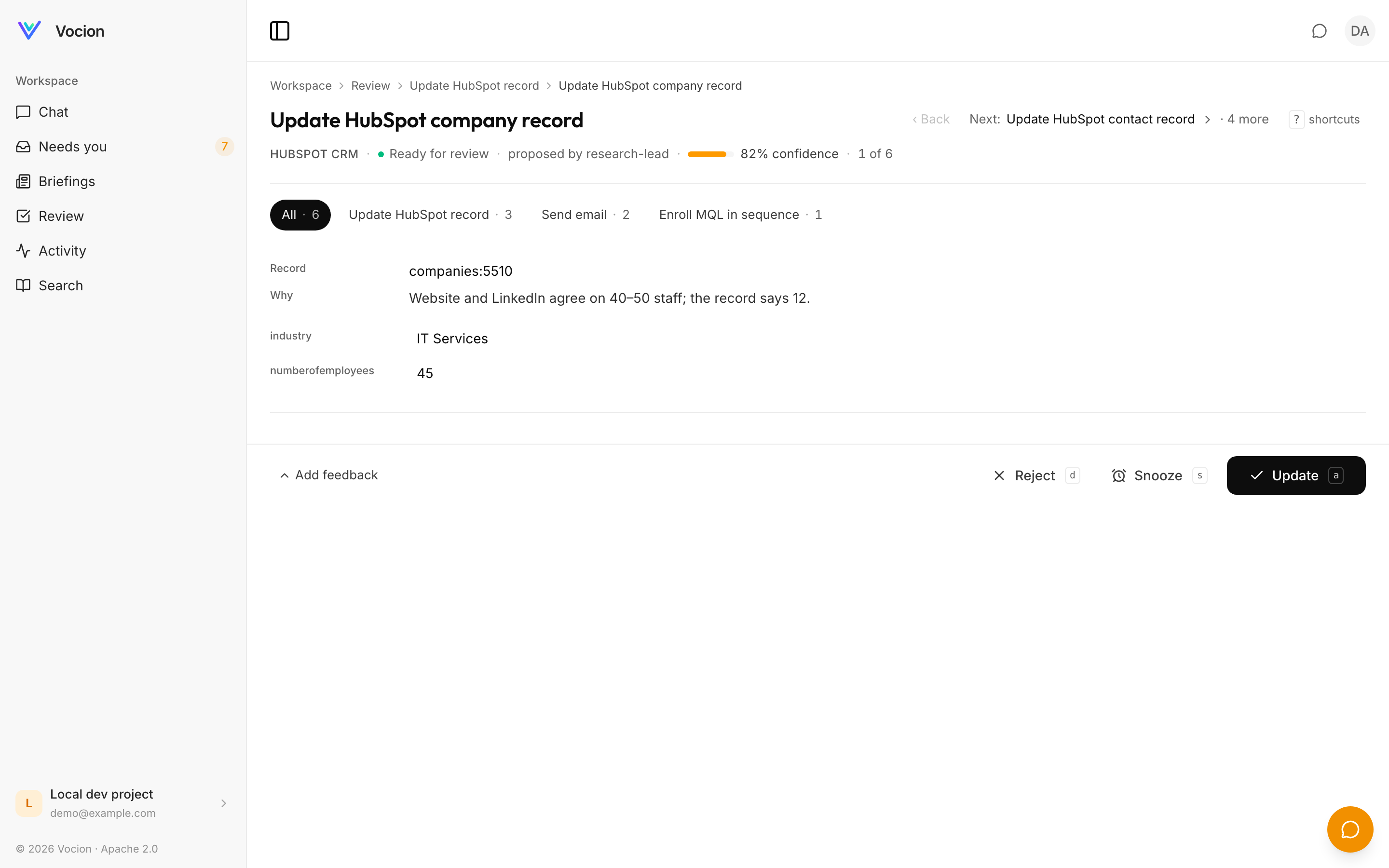
A context title that names the record, type chips that say what kind of decision this is, and the actions in a bar pinned to the bottom of the screen.
What changed
The page says what you are looking at. features/review/ReviewHeader.tsx renders a breadcrumb — Workspace › Review › type › record — then an H1 naming the decision and its subject (Enroll MQL in sequence — Jamie Smith · Redpoint IT), falling back to the card title when a proposal has no subject. One meta row underneath carries the source, the state, the proposing agent, the confidence as a thin inline meter rather than a badge box, and the queue position. It also sets document.title, so the browser tab names the decision.
The type filter is chips, not a dropdown. features/review/TypeChips.tsx — All · N then one chip per type with its count, active chips filled in ink, the raw action id in the tooltip. Same multi-select state and the same ?type= URL parameter as before.
Up-next folds away. The persistent right rail is gone, replaced by features/review/UpNextMenu.tsx: a header-right line reading Next: <title> › · N more, opening a popover of the next ten with a "Skip to" on each and a "Load more" that pages the window. The thing you are deciding gets the width.
The decision never scrolls off. features/dashboard/StickyActionBar.tsx pins the verbs to the bottom of the content column rather than the viewport, so a conversation rail beside the page is never covered. The primary is in ink and named for the action (Enroll, Update, Approve & send); Snooze and Decline are ghosts; "Add feedback" is collapsed until you want it, and Regenerate only enables once there is text. On a phone the bar stacks full-width, primary first, with safe-area padding.
Keyboard. features/review/reviewShortcuts.ts binds j and k to next and back, a to approve, d to decline, s to snooze, and ? to toggle the hint. Modifier chords are ignored and nothing fires while you are typing in a field.
One primary action per screen. Not one in the header and another in the body.
The boxes are gone. ReviewActionCard gained a presentation="page" mode: no outer card, provenance as one hairline row, the recommendation as an eyebrow plus one bold line plus a paragraph, and inputs with a soft fill on focus instead of a border. The card presentation the lead console and the conversation rail use is untouched.
| Bordered or rounded container on this page | before | after |
|---|---|---|
| Filter dropdown bar | 1 | 0 |
| Outer card + confidence badge box | 2 | 0 |
| Recommendation tint box + button box | 2 | 0 |
| Up-next rail rows | one per item | 0 |
| Bordered inputs | per field | 0 |
| Feedback textarea box | 1 | 0 collapsed |
| Decision buttons | 3 outlined | 1 ink + ghosts, sticky |
The same change is happening across the dashboard — see A pattern library for list, detail and ledger.
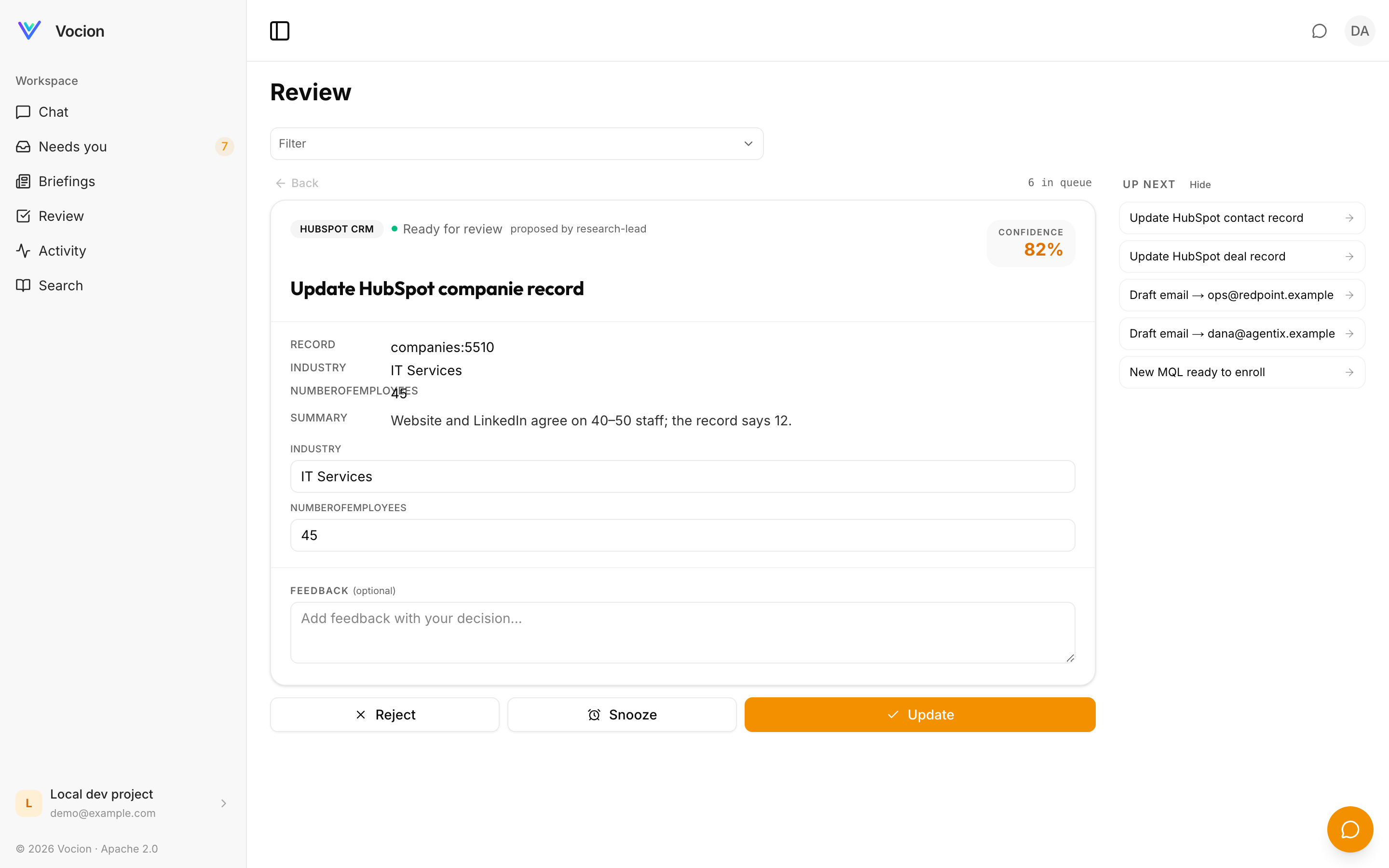 The same decision, previously: a bordered panel per section, the queue holding a column, and the actions somewhere below the fold.
What did not change
Every verb the page had, it still has, and they go through the same calls: approve, edit-then-approve, decline, snooze, regenerate. Feedback you leave on a decision is still a learning signal rather than a comment box. A failed execution is still named and retryable — see Review queue: failures you can see and retry.
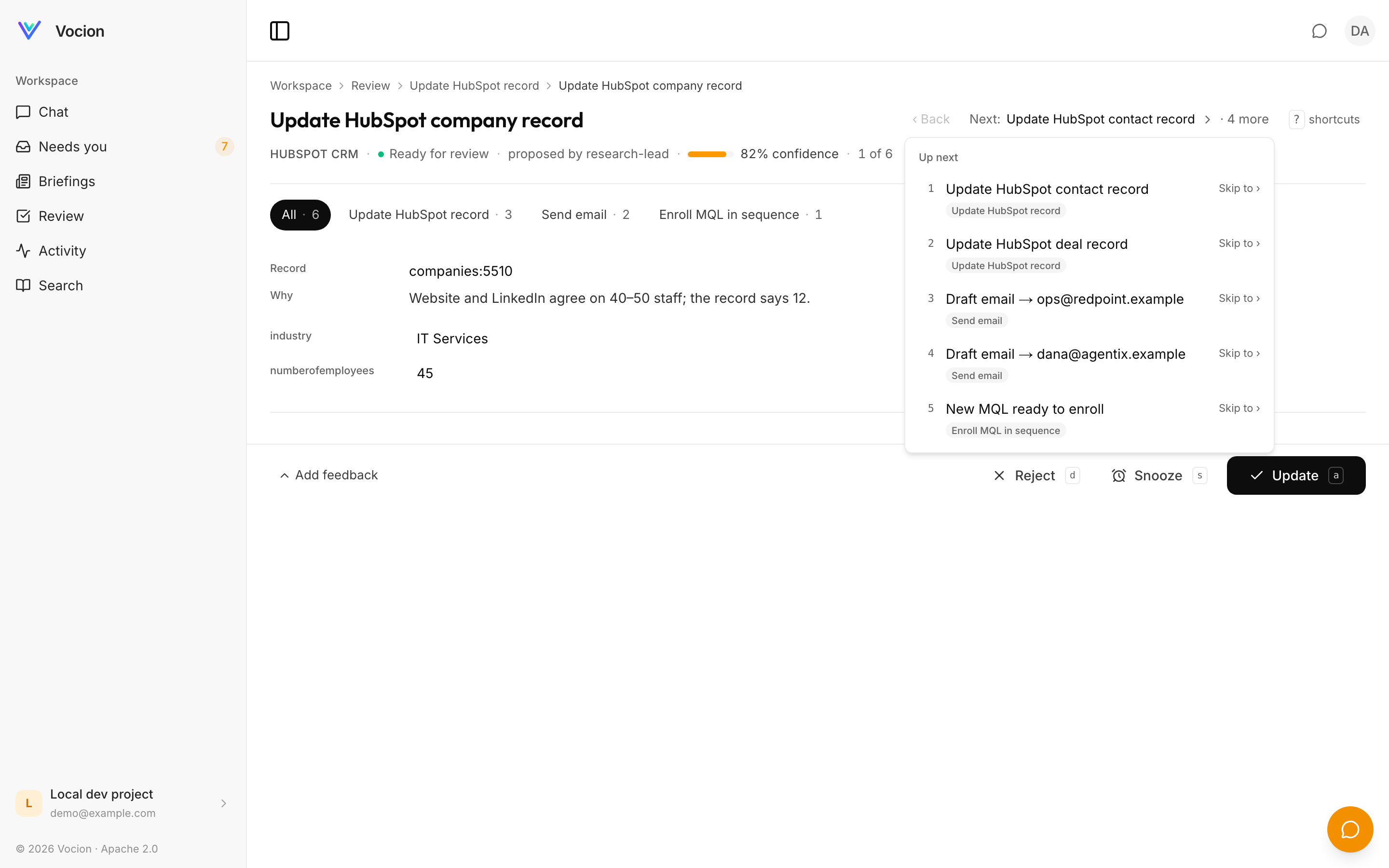 The queue behind the current item, one tap away instead of permanently on screen.
Where this lives in the repo
vocion-core#337, shipped on release/2026-09-15-rail at 7db4f7f6 (the review commit inside it is 7aa327e7) and merging to main individually behind it.
- Header, chips, up-next:
packages/core/src/features/review/ReviewHeader.tsx,TypeChips.tsx,UpNextMenu.tsx - Sticky bar:
packages/core/src/features/dashboard/StickyActionBar.tsx - Shortcuts:
packages/core/src/features/review/reviewShortcuts.ts - The page was split into a data half and a pure view —
features/dashboard/ReviewFocus.tsxandfeatures/review/ReviewFocusView.tsx— so the view renders in a story with no data layer - Decide, snooze and regenerate were extracted into
packages/core/src/features/review/useReviewDecision.ts, so a record's own detail page decides the same run through the same calls as the queue - Nineteen unit tests on the changed files: chip toggle state and
aria-pressed, queue position, key-to-action mapping with modifier chords ignored and never firing in a field, and static renders of the sticky bar and chips
Not verified: hover reveal and keyboard focus on a real pointer and keyboard beyond the automated capture; the browser test project is the arbiter for the client components.
Related: Agents now recommend a decision and Catch-up triage and team briefings.